Saturday, August 22, 2015

How to View All Text in Wide Word Documents

Posted by Admin

 
By default Word displays the text on your screen the same way it will appear when you print your document. Most trainers call this what you see is what you get, or WYSIWYG.

There are times, however, when viewing your document in this way just doesn’t work for you. (i.e., very wide documents, screens with low resolution). When this happens, the only way to see all of your text horizontally is to scroll back and forth which can very quickly become bothersome.
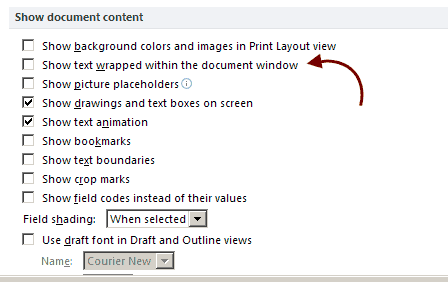
Follow the steps below to view all text horizontally:

  1. Display the Word Options dialog box by clicking the File tab of your Ribbon and Options.
  2. At the left-hand side of the dialog box, click Advanced.
  3. Scroll down until you see the Show Document Content section.
  4. Be certain the Show Text Wrapped Within the Document Window has been deselected.
  • Click on OK.
  • Basically, the check box you deselected turns off most of the WYSIWYG features in Word. Now none of your document lines will extend past the right edge of your Word screen.
  • Once you are finished and would again like to see your document as it will appear when printed, you will simply repeat the steps above.
Read More

Google Hangouts 4.0 Released for Android With Revamped Features

Posted by Admin
Besides the major organizational changes such as naming a new CEO, Google has also been working behind the scenes to upgrade its Hangout app.

The search giant has finally introduced hangout 4.0 for Android, giving this messaging app a sleek and simple look. According to the team of Google, this new hangout 4.0 has been updated with the company’s material design philosophy.

Here you find what’s new in this app:

Hangout is simpler: The addition of a new compose button makes it easier for the users to start a new group or conversation. Their streamlined contact list helps you to find contacts quickly and easily. Not only this, but the attachments have also been revamped and simplified. Therefore, sharing GIFs, emoji or even multiple photos at a time have been made simple and easier.

Hangout looks sleeker: As it is already mentioned that it has been updated with material design, hangout has got a new look and feel which means items will now respond to your touch in more intuitive ways, and the transitions between tasks are made more fluid.

Hangout is getting faster: Whether you are video chatting with anyone or sending a quick message, you don’t need to hold up. The team of Google has been obsessively fixing bugs as well as speeding message delivery to make this application faster and reliable. Less battery consumption is an added feature of this app.

This Hangout 4.0 will now include ID while making calls and you can also reply to group messages in Hangout using Google voice calls. Android users can send messages on Hangout directly from the watch. In chat screen, Hangouts now looks like iMessage for its rounded conversation bubbles and floating features. A new menu bar at the bottom of the message entry field has replaced the paperclip button, and this allows for a quick addition of emojis, pictures or location to your message. This feature has also added another thing—your image will no longer show up at the chat window. The color scheme of chat has been revised: your comments will be shown in white while that incoming can be seen in green.

However, the tablet version of hangout 4.0 does not look so special. It is a blown up version of the original one. Hangouts for Android watch have also been updated, and it has added many new features to it. The updated Smartwatch functionality now lets users set custom status and send messages through a voice command such as ‘Ok Google, send a Hangout Message’. While this new version of Hangout has been rolling out for Android users, it is soon going to be launched for iOS and Windows as well.

Hangout 4.0 users can see previewed messages and notes at the bottom of the screen. To avail these exciting features of the hangout, users need to update their Gmail or it will automatically update once you sign in to Gmail account. The team of the search engine giant hopes that this new version will create a better user experience, and they can make their Gmail inbox smarter. However, this new version is yet to launch in India and some other parts of the world; it is hoped that it will create a sensation in the online platform. In this new Gmail, users can find contacts faster, and the style of adding attachments has been changed. Google Hangout 4.0 users can see preview messages or photo by tapping the ‘image’ or ‘note attachment button’. All these features have given this upgraded hang out a whole new look with Android users getting innumerable benefits from it.
Read More

WhatsApp 2.12.235 APK Backs Up Messages on Google Drive

Posted by Admin
There is a new version of WhatsApp free download, and it is available for download for users of Android devices. The latest version is 2.12.235 and it is still in beta which means it cannot be found at the Google Play Store.

Despite its absence on the official Play Store, WhatsApp 2.12.235 APK can still be installed on your Android device. This new beta version comes in with quite a number of interesting additions to this already amazing instant messaging app.

Millions use WhatsApp for not only instant messaging purposes but also for voice calling services. The popularity of this messenger cannot be taken for granted and it can be true to say that this Facebook-owned messenger rules the world of IM.

What’s new?

Since its introduction in 2009 and the takeover by Facebook in 2014, WhatsApp has grown into a dependable application when it comes to communication. On the latest version, users will come across a much-touted feature – ability to save messages on Google Drive. There is no doubt that this is an amazing addition to the developers of the app, but since it is still in its initial stages, it is being rolled out in what seem to be phases.

As previously noted, WhatsApp has become a basic form ofcommunication, and it is used across the globe. As a result, the brains behind the app keep on rolling out new updates and with each update, there comes a new feature, bug fixes, and error fixes as well. All these are usually aimed at retaining the current users as well as attracting new users while at the same time ensuring the usage of the app becomes much easier and better. The current update will only but make things a lot better, easier and safer when it comes to saving messages.

WhatsApp 2.12.235 APK free download now available

The latest version of WhatsApp 2.12.235 is available for free download, but since it is still in beta, it cannot be downloaded directly from the Play Store. To install it on your Android device, you must visit the official website of the app and get the app from there.

This version comes with advanced features and new additions to the current platform that makes its performance much better. The new update has some limitations that might result in the app working on a limited number of devices.

According to Android Police, users must be using Android 5.0 Lollipop and above to enjoy the latest features available on WhatsApp 2.12.235 APK. However, this is expected to change very soon as more devices get the update, but it is not known when those using older versions of Android OS will be able to access this feature.

WhatsApp backup can be accessed from any device

In the past, users have raised their concerns regarding the issue of losing their messages when they lose their phones. This happened because WhatsApp creates chat history backups on the default storage of your phone, and when it disappears, it disappears with the messages. This will no longer be the case as the messages will now be accessible through any device that has access to your Google Drive account.

To backup WhatsApp messages on Google Drive, open the app and tap on the Settings>Chat & Calls>Chat Backup” and then proceed by tapping on the Backup button. Remember your messages are being saved on Google Drive and as a result, you must allow WhatsApp and Google Drive to communicate and backup your chat history in a cloud.
Read More